Buildroot 系统构建
本章节将指导您如何基于 DshanPi-R1 Buildroot SDK 快速构建系统镜像。
1. 获取开发环境
为了方便开发者快速上手,我们提供了一个已经配置好 Buildroot SDK 环境的 Ubuntu 虚拟机镜像。
重要提示
- 提供的虚拟机基于 Ubuntu 20.04,环境已完全搭建好。
- 请勿升级系统版本,否则可能导致编译环境被破坏。
下载链接
- 百度网盘:RK3568-DshanPI-R1+ https://pan.baidu.com/s/18mChwDawI0Y_w6PYkueRUQ
- 提取码:
x9wi
2. 编译 SDK
2.1 准备工作
-
启动虚拟机,使用以下账户登录:
- 用户名:
ubuntu - 密码:
ubuntu
- 用户名:
-
打开终端,进入 SDK 根目录:
cd 100ask-rk3568_linux5.1_sdk/查看 SDK 目录结构
.
├── app
├── buildroot
├── build.sh -> device/rockchip/common/scripts/build.sh
├── debian
├── device
├── docs
├── envsetup.sh -> buildroot/build/envsetup.sh
├── external
├── kernel
├── Makefile -> device/rockchip/common/Makefile
├── output
├── prebuilts
├── README.md -> device/rockchip/common/README.md
├── rkbin
├── rkflash.sh -> device/rockchip/common/scripts/rkflash.sh
├── rockdev -> output/firmware
├── tools
├── u-boot
└── yocto

14 directories, 5 files
2.2 执行编译
编译过程非常简单,只需两步操作:
步骤 ①:选择板级配置文件
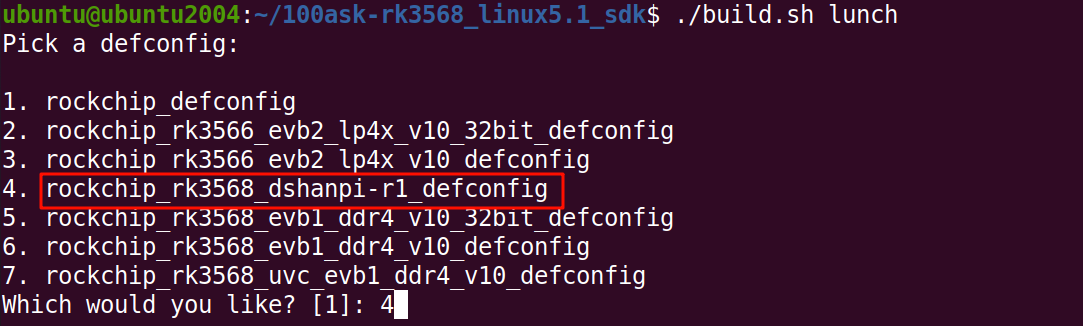
在 SDK 根目录下执行 lunch 命令:
./build.sh lunch
在弹出的菜单中,选择 rockchip_rk3568_dshanpi-r1_defconfig。
步骤 ②:开始全量编译
继续执行以下命令开始编译:
./build.sh
编译时间
编译耗时取决于您的电脑性能,请耐心等待。
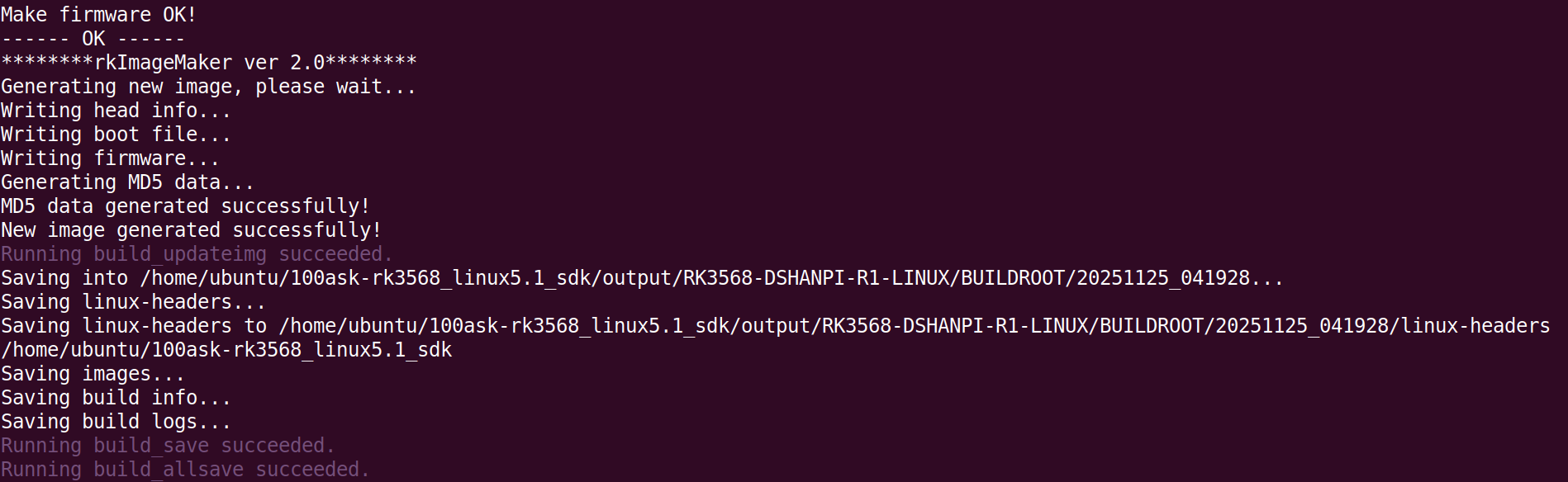
编译成功后,您将看到类似如下的输出:
2.3 获取镜像
编译完成后,所有镜像文件会自动生成在 output/update/Image/ 目录下。
cd /home/ubuntu/100ask-rk3568_linux5.1_sdk/output/update/Image
ls -l
查看生成的镜像文件列表
.
├── boot.img -> ../../../kernel/boot.img
├── MiniLoaderAll.bin -> ../../../u-boot/rk356x_spl_loader_v1.16.112.bin
├── misc.img -> ../../../device/rockchip/common/images/wipe_all-misc.img
├── oem.img -> ../../firmware/oem.img
├── package-file
├── parameter.txt -> ../../../device/rockchip/.chips/rk3566_rk3568/parameter-buildroot-fit.txt
├── recovery.img -> ../../../buildroot/output/rockchip_rk3568_recovery/images/recovery.img
├── rootfs.img -> ../../../buildroot/output/rockchip_rk3568_dshanpi-r1/images/rootfs.ext2
├── uboot.img -> ../../../u-boot/uboot.img
├── update.img
├── update.raw.img
└── userdata.img -> ../../firmware/userdata.img

0 directories, 12 files
关键文件
update.img 即为最终生成的系统镜像,可直接用于烧录到 DshanPi-R1 开发板。
3. SDK 命令详解
build.sh 是 Rockchip SDK 的核心构建脚本,支持多种参数。
在 SDK 根目录下执行 ./build.sh help 可查看完整帮助信息:
cd ~/100ask-rk3568_linux5.1_sdk/
./build.sh help
点击查看完整命令参数说明
Usage: build.sh [OPTIONS]
Available options:
chip               - choose chip (选择芯片平台)
defconfig          - choose defconfig (选择配置文件)
 *_defconfig       - switch to specified defconfig (直接切换到指定配置)
    Available defconfigs:
    rockchip_defconfig
    rockchip_rk3566_evb2_lp4x_v10_32bit_defconfig
    rockchip_rk3566_evb2_lp4x_v10_defconfig
    rockchip_rk3568_dshanpi-r1_defconfig
    rockchip_rk3568_evb1_ddr4_v10_32bit_defconfig
    rockchip_rk3568_evb1_ddr4_v10_defconfig
    rockchip_rk3568_uvc_evb1_ddr4_v10_defconfig
 olddefconfig      - resolve any unresolved symbols in .config
 savedefconfig     - save current config to defconfig
 menuconfig        - interactive curses-based configurator (图形化配置菜单)
kernel             - build kernel (单独编译内核)
modules            - build kernel modules (编译内核模块)
linux-headers      - build linux-headers
loader             - build loader (uboot|spl)
uboot              - build u-boot (单独编译 U-Boot)
spl                - build spl
uefi               - build uefi
wifibt             - build Wifi/BT
rootfs             - build default rootfs
buildroot          - build buildroot rootfs (单独编译 Buildroot 文件系统)
yocto              - build yocto rootfs
debian             - build debian rootfs
recovery           - build recovery
pcba               - build PCBA
security_check     - check contidions for security features
createkeys         - build secureboot root keys
security_uboot     - build uboot with security paramter
security_boot      - build boot with security paramter
security_recovery  - build recovery with security paramter
security_rootfs    - build rootfs and some relevant images with security paramter
firmware           - generate and check firmwares (打包固件)
updateimg          - build update image (生成 update.img)
otapackage         - build OTA update image
sdpackage          - build SDcard update image
all                - build all basic image
save               - save images and build info
allsave            - build all & firmware & updateimg & save (默认选项:全编译并打包)
cleanall           - cleanup (清理编译产物)
post-rootfs        - trigger post-rootfs hook scripts
shell              - setup a shell for developing
help               - usage

Default option is 'allsave'.