DshanPI-A1 Review Part 4: Modifying an Open-Source Gesture Project
All of the project modifications in this article are based mainly on compatibility, smoothness, screen display method, and camera invocation.
Display Output Adaptation
Main Adaptation Issues
1. RK3576 Runs a Pure Wayland Environment
RK3576 runs a pure Wayland environment with no X11 or libGL support, so the traditional cv2.imshow() cannot be used to display images.
[Solution]
Adopt the FIFO + GStreamer + Wayland display pipeline:
# Python side code
fifo = open('/tmp/gesture_fifo', 'wb')
while True:
    _, jpeg = cv2.imencode('.jpg', processed_frame,
                [cv2.IMWRITE_JPEG_QUALITY, 85])
    fifo.write(jpeg.tobytes())
    fifo.flush()
# Shell side code
# GStreamer reads the JPEG stream from the pipe and displays it
gst-launch-1.0 filesrc location=/tmp/gesture_fifo ! \
    jpegparse ! jpegdec ! videoconvert ! waylandsink fullscreen=true
2. IMX415 Camera Color Anomaly on Second Launch
The IMX415 camera shows a color anomaly on its second launch, with the kernel reporting the error "no first iq setting".
[Solution]
Restart rkaiq_3A_server before each camera open:
def restart_3a(self):
    os.system("killall rkaiq_3A_server 2>/dev/null")
    time.sleep(2)
    os.system("rm -f /tmp/.rkaiq_3A* 2>/dev/null")
    os.system("/etc/init.d/S40rkaiq_3A start >/dev/null 2>&1")
    time.sleep(5)
Project 1: Snake Game
Open-source project address: Project2/SnakeGame/main.py at main · WLHSDXN/Project2
Modification Process
1. Multi-Layer Detector Architecture
To accommodate different dependency environments, a three-layer detector fallback mechanism was designed:
Priority 1: cvzone (MediaPipe wrapper, high accuracy)
  ↓ unavailable
Priority 2: native MediaPipe (21 keypoints)
  ↓ unavailable
Priority 3: HSV skin-color detection (lightweight fallback)
Code implementation:
# Detector selection logic
if USE_CVZONE:
    detector = CvzoneHandDetector(detectionCon=0.8, maxHands=1)
elif USE_MEDIAPIPE:
    detector = MediapipeHandDetector(maxHands=1,
                    detectionCon=0.5,
                    drawLandmarks=False)
else:
    detector = SimpleHandDetector()  # HSV fallback solution
2. MediaPipe Integration and Wrapping
Implemented the MediapipeHandDetector class, returning a data format compatible with cvzone:
class MediapipeHandDetector:
    def findHands(self, frame, flipType=False):
        img_rgb = cv2.cvtColor(frame, cv2.COLOR_BGR2RGB)
        results = self.hands.process(img_rgb)

        hands = []
        if results.multi_hand_landmarks:
            for hand_landmarks in results.multi_hand_landmarks:
                # Extract 21 keypoint coordinates
                lmList = []
                for lm in hand_landmarks.landmark:
                    x_px = int(lm.x * width)
                    y_px = int(lm.y * height)
                    lmList.append([x_px, y_px, lm.z])

                hands.append({'lmList': lmList})

        return hands, frame
[Key Point]
The index fingertip is lmList[8], used directly as the snake-head control point.
3. HSV Skin-Color Detection Fallback
When MediaPipe is unavailable, use simple skin-color detection:
def detect_hand_simple(frame):
    hsv = cv2.cvtColor(frame, cv2.COLOR_BGR2HSV)
    mask = cv2.inRange(hsv, [0, 30, 60], [255, 255, 255])

    # Morphological denoising
    kernel = np.ones((7, 7), np.uint8)
    mask = cv2.morphologyEx(mask, cv2.MORPH_CLOSE, kernel, iterations=3)
    mask = cv2.morphologyEx(mask, cv2.MORPH_OPEN, kernel, iterations=2)

    contours, _ = cv2.findContours(mask, cv2.RETR_EXTERNAL,
                    cv2.CHAIN_APPROX_SIMPLE)
    if contours:
        c = max(contours, key=cv2.contourArea)
        hull = cv2.convexHull(c)
        # Extract the topmost point as the "fingertip"
        topmost = hull[hull[:, :, 1].argmin()][0]
        return topmost
4. MediaPipe Performance Tuning
Optimization 1: Use a Lightweight Model
self.hands = mp.solutions.hands.Hands(
    model_complexity=0,  # 0=lite, 1=full (default)
    max_num_hands=1,
    min_detection_confidence=0.5,  # lower threshold for speed
    min_tracking_confidence=0.5
)
Optimization 2: Disable Visualization Drawing
# Remove the time-consuming keypoint drawing
# mp_drawing.draw_landmarks(frame, landmarks, connections)  # commented out
drawLandmarks=False  # new switch
Optimization 3: Reduce Input Resolution
# 640x480 is already the optimal balance point
# Lowering further to 320x240 can boost FPS, but hurts detection accuracy
cap.set(cv2.CAP_PROP_FRAME_WIDTH, 640)
cap.set(cv2.CAP_PROP_FRAME_HEIGHT, 480)
Optimization 4: Optimize the Camera Buffer
cap.set(cv2.CAP_PROP_BUFFERSIZE, 1) # reduce latency
[Optimization Effect]
FPS increased from 5-10 to 15-25 FPS, meeting the needs of game interaction.
5. File-Based Control Interface
Because keyboard input cannot be captured directly in FIFO mode, a control-file approach is used:
# Shell script section
# Read keypresses and write control files
stty echo icanon
while read n1 t 0.1 key; do
    if [ "$key" = "r" ]; then
        touch /tmp/snake_restart
    elif [ "$key" = "q" ]; then
        touch /tmp/snake_quit
    fi
done
# Python section
# Detect control files
if os.path.exists('/tmp/snake_quit'):
    print('Quit command detected')
    break

if os.path.exists('/tmp/snake_restart'):
    os.remove('/tmp/snake_restart')
    # Reset game state
    self.game.gameOver = False
    self.game.points = []
    self.game.previousHead = (0, 0)
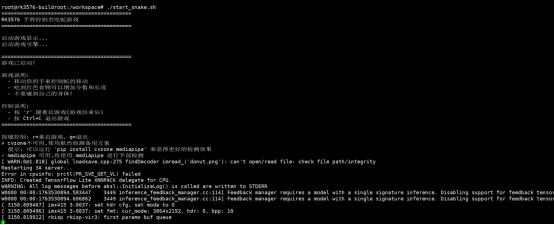
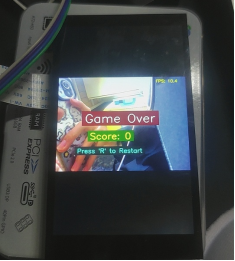
Effect Demonstration
The code and demo video are in the attachments.
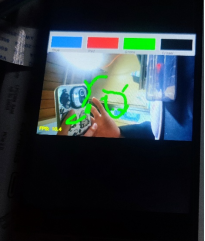
Project 2: Virtual Drawing Board
Open-source project: [Based on hand keypoint detection, air-control the mouse / air-draw] https://www.bilibili.com/video/BV1364y1h7PS?vd_source=a16ca768198c38baa684546cf5060811
Modification Process
1. Core Logic Extraction
Gesture Recognition Logic:
fingers = detector.fingersUp()  # returns 5 values, 1 means finger extended

# Mode 1: select tool (index + middle finger extended)
if fingers[1] and fingers[2]:
    if y1 < 153:  # in the top toolbar area
        if 0 < x1 < 320:    color = [50, 128, 250]  # blue
        elif 320 < x1 < 640:  color = [0, 0, 255]    # red
        elif 640 < x1 < 960:  color = [0, 255, 0]    # green
        elif 960 < x1 < 1280: color = [0, 0, 0]     # eraser

# Mode 2: draw (only index finger extended)
elif fingers[1] and not fingers[2]:
    cv2.line(imgCanvas, (xp, yp), (x1, y1), color, brushThickness)
Canvas Compositing Logic:
# 1. Convert the canvas to grayscale and binarize it
imgGray = cv2.cvtColor(imgCanvas, cv2.COLOR_BGR2GRAY)
_, imgInv = cv2.threshold(imgGray, 50, 255, cv2.THRESH_BINARY_INV)

# 2. Composite with bitwise operations
img = cv2.bitwise_and(img, imgInv)    # keep non-drawing area of camera frame
img = cv2.bitwise_or(img, imgCanvas)   # overlay drawing content
2. Display System Rebuild
Reuse the snake game's display solution: FIFO + GStreamer.
3. Toolbar Internalization
The original project depended on 4 PNG images as the toolbar, which is inconvenient for managing external resources on an embedded system.
[Solution]
Generate the toolbar with OpenCV drawing APIs:
def create_header(self):
    """Dynamically generate the toolbar"""
    header = np.zeros((100, self.width, 3), np.uint8)
    header[:] = (200, 200, 200)  # gray background

    tools = [
        ((250, 128, 50), "Blue"),  # BGR format
        ((0, 0, 255), "Red"),
        ((0, 255, 0), "Green"),
        ((0, 0, 0), "Eraser")
    ]

    section_width = self.width // 4
    for i, (color, label) in enumerate(tools):
        x1 = i * section_width
        x2 = (i + 1) * section_width

        # Draw color block
        cv2.rectangle(header, (x1 + 10, 20), (x2 - 10, 80), color, -1)
        cv2.rectangle(header, (x1 + 10, 20), (x2 - 10, 80),
               (255, 255, 255), 2)  # white border

        # Text label
        cv2.putText(header, label, (x1 + 20, 95),
              cv2.FONT_HERSHEY_SIMPLEX, 0.5, (50, 50, 50), 1)

    return header
This way there is zero dependency on external resources, which is better for porting and project development!
4. Camera and 3A Service Adaptation
Reuse the snake game's fix.
5. Resolution vs. Performance Trade-off
[Original Configuration]:
width = 1280, height = 720
canvas: imgCanvas = np.zeros((720, 1280, 3), np.uint8)
[RK3576 Optimization]
width = 640, height = 480  # reduce resolution by 50%
canvas: imgCanvas = np.zeros((480, 640, 3), np.uint8)
[Reasons]
- MediaPipe's FPS roughly doubles at 640x480
- The drawing-board application does not demand as high a resolution as vision recognition
- JPEG encoding/transmission is faster
[Toolbar Adaptation]
Original: 153 pixels tall at the top, divided into 4 regions 320 pixels wide RK3576: 100 pixels tall at the top, divided into 4 regions 160 pixels wide
section_width = self.width // 4  # adaptive width
if y1 < 100:  # toolbar height
    if 0 < x1 < section_width:
        self.color = (250, 128, 50)  # blue
    elif section_width < x1 < section_width * 2:
        self.color = (0, 0, 255)   # red
# ...
6. Interaction Control Improvements
1. Clear-Canvas Mechanism
[Original]
if all(x >= 1 for x in fingers):
    imgCanvas = np.zeros((720, 1280, 3), np.uint8)
[Problem]
High false-trigger rate; inconvenient for fine control.
[RK3576 Improvement]
Use keypress control:
# Shell side
while read -n1 -t 0.1 key; do
    if [ "$key" = "c" ]; then
        touch /tmp/painter_clear
    fi
done
# Python side
if os.path.exists('/tmp/painter_clear'):
    os.remove('/tmp/painter_clear')
    self.imgCanvas = np.zeros((self.height, self.width, 3), np.uint8)
    print("Canvas cleared")
2. Exit Control
[Original]
Can only capture the keyboard through cv2.waitKey(1), dependent on window focus.
[RK3576]
Dual exit mechanism:
-
Keypress control: touch /tmp/painter_quit -> Python detects it and exits
-
Ctrl+C: Shell script traps the signal -> kills all processes -> cleans up the FIFO
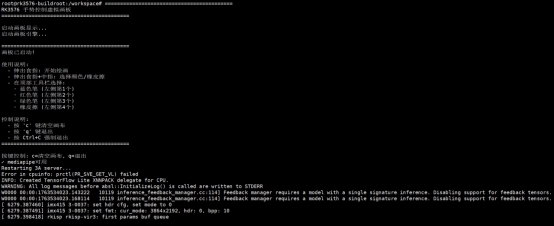
Effect Demonstration
The code and demo video are in the attachments.
Technical Summary and Lessons
-
Cross-Platform Display Adaptation PC GUI solutions do not apply to embedded systems; the output method must be chosen based on system characteristics (Wayland/Framebuffer).
-
Resource Internalization Embedded systems tend toward single-file deployment; external resources should be turned into code-generated content or packed into the program.
-
Tiered Performance Optimization
- Algorithm layer: lightweight models
- Implementation layer: disable non-essential drawing
- Hardware layer: buffer/resolution tuning
-
Interaction Adaptation Keyboard/mouse events that GUIs depend on must be converted to file control or GPIO triggers.